Sunday, August 28, 2011

Fake Mac Security


The macsecurity scam: Scammers have released a new fake computer security tool. This time though, it targets mac users via the rogue mac security software. This particular Mac security virus may appear as a mac internet security software but is in fact a fake program trying to scam people.

Characteristics of Macsecurity virus
Symptoms of this mac secruity malware include causing PCs to show fake scans and popups. This malicious program give an impression that the computer has infections and security threats. Those who were led to believe that there mac has mac security vulnerabilities are then enticed to pay for this non working mac virus software.

How to remove Macsecurity

1. Open Activity Monitor from the Utilities folder. Make sure the drop-down menu is set to “all processes.”
2. Use the search field in Activity Monitor to search for Macsecurity.
3. Click on the Macsecurity process. Click the “Quit Process” button. Click “Force Quit.”
4. Drag the Macsecurity program (installed in the Applications folder by default) to the Trash. Empty the Trash.
5. Remove MacProtecter from the Login Items for your Account in the OS X System Preferences (if it exists).


Do tell your friends about this fake mac security scam. This will help prevent the spread of the macsecurity malware.
Antivirrt


The Antivirrt.net and antivirrt.com websites pretend as domains that market Antivirus Protection software. Antivir rt antivirus protection is already known as a bogus computer security tool.


Like most other fake antivirus malwares, the Antivir rt virus may keep redirecting -infected computers to the http://Antivirrt.net or antivirrt.com domains. The Antivirrt.net hijacker does this to bombard users with ads that try to entice them to buy the Antivirus Protection license or activation key. Please avoid downloading any links or paying for anything that the www.Antivirrt.net website offers. The http://Antivirrt.net is a scam.

Antivir rt removal: How to remove Antivirrt.net
It is advised to remove the infection to free your computer from the annoying browser redirects and popups. You may want to read this post on how to get rid of fake Antivirus Protection infection.

Internet Explorer Emergency Mode

The Internet Explorer Emergency Mode pop-up that you may see in your computer is likely a malicious program designed to to make you believe you need to buy a fake antivirus protection tool which actually do not work. You may see this malware displaying this:

MacDefender


The mac defender hoax software is an example of a rogue antivirus that is now targeted to users of the mac operating system. Another example of this is the macprotector malware. These roguewares have the ability to make itself look like a legitimate software. The fake mac defender scam is targeted towards Mac users who may be lured to believe that their mac computers have been compromised by trojans, viruses and other malwares. Do not be deceived by this BestMacAntivirus2011. mpkg malware.

Facebook Abuse Department Change Password Email Scam


The facebook abuse department email
Have you received this message?

Dear client

Spam is sent from your FaceBook account.
Your password has been changed for safety.
Information regarding your account and a new password is attached to the letter.
Read this information thoroughly and change the password to complicated one.
Please do not reply to this email, it's automatic mail notification!

Thank you for using our services.
Your Facebook!

If yes, then you have been targeted as a potential victim of the Facebook Abuse Department Change Password Email Scam. Be wary of this facebook abuse department virus. The message did not come from the "facebook abuse department" but is likely from scammers who want to get and use your facebook account and information. Stay away from the links provided by the facebook abuse department scam mail. Should you need to check your facebook account, do not follow the links provided by the facebok abuse department virus email. Go to the facebook website directly and check or change your settings and passwords from there.

Antivirat

The Antivirat.com website is yet another unreliable website that tries to look like a website that promotes and sells an anti virus protection software, the Antivirus Protection anti-virus protector. Antivirat is already known as a non working anti virus protection software.

Like most other fake antivirus malwares, the Antivir at virus may keep redirecting -infected PCs to the http://Antivirat.com site. The Antivirat.com hijacker does this to bombard users with ads that try to entice them to buy the Antivirus Protection license or activation key. Please avoid downloading any links or spending money to pay for anything that the www.Antivirat.com website promotes. The http://Antivirat.com is a hoax.

Antivir at removal: How to remove Antivirat.com

It is best to remove the infection to free your computer from the annoying browser redirects and popups. You may want to read this article on how to get rid of rogue Antivirus Protection infection.

OpenCloud Antivirus

The OpenCloud Antivirus is a misleading malware that has the intent to defraud computer users by making itself appear a real and working security software. The Open Cloud Antivirus, for example, causes infected computers to generate alerts showing that the Opencloud AV has detected viruses, trojans and other malwares in the computer.


The Open Cloud Antivirus Scam
The motive behind the misleading alerts is to make likely victims believe that the best way to remove the viruses and other computer virus problems in their PC is to purchase the Opencloud antivirus which happens to be a rogue security tool. Do not fall to the opencloud antivirus scam. Paying for the license key and full version of the software will not help you secure your PC from threats. Creators of the opencloud virus are only after scamming you and are trying to steal your hard earned money from you.

How to remove Opencloud antivirus virus

You can follow the guide below on opencloud antivirus removal at your own risk. For a guaranteed result, however, consult a computer professional to fix computer problems for you.

1. Download mbam-setup.exe and then rename mbam-setup.exe to iexplore.exe
2. Launch iexplorer.exe to install Malwarebytes
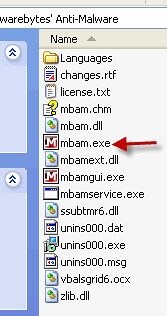
3. Once the program is installed, navigate to your Program Files\Malwarebytes' Anti-Malware folder.

open cloud av virus

Find mbam.exe and rename to iexplore.exe
4. Doubleclick iexplore.exe to launch Malwarebytes
5. Click the "Update" tab and click the "Check For updates" button.
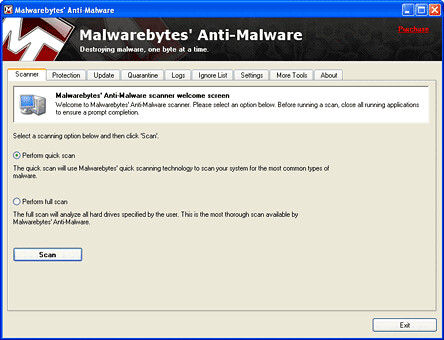
6. Once the program has loaded and updates were downloaded, select "Perform Quick Scan", then click Scan.
open cloud virus
7. Once the scan is complete, click OK, then Show Results to view the results.
8. Make sure that everything is checked, and click Remove Selected.


You may also want to refer to this post on how to get rid of fake antivirus infections.

 
design by suckmylolly.com