The fake pc cleaner pro is another malicious program that pretents to detect and fix errors and security issues in your PC. This malicious program can make you believe that you need the software it promotes to boost the efficiency of your PC. This article provides information on how to get rid of PC cleaner virus.
The PC cleaner scam
PC Optimiser is a clone of the several othe fake defragmentation and optimization tools. Its symptoms may include browser redirects and generation of deceitful warnings and popups. Do no fall to the traps of the PC cleaner scam.
PC cleaner removal
Removing PC cleaner is necessary since the symptoms of defrag cleaner viruses can be annoying: popups, fake system scan, browser hijacking and even inability to access websites you want to visit.
PC cleaner free removal: How to remove PC cleaner pro
* Reboot your computer in Safe mode with networking.
* Malwarebytes is getting recognized as a reliable fake antivirus removal tool and you can download this program and use as a PC cleaner removal tool.
* Double-click mbam-setup.exe and follow the prompts to install the program.
* At the end, be sure a check-mark is placed next to the following:
Update Malwarebytes’ Anti-Malware
Launch Malwarebytes’ Anti-Malware
* Click Finish.
* If an update is found, Malbytes anti malware will download and install the latest version.
* Once the program has loaded, select Perform quick scan, then click Scan.
* When the scan is complete, click OK, then Show Results to view the results.
* Be sure that everything is checked, and click Remove Selected. Reboot your computer if prompted.
* When completed, a log will open in Notepad. The PC cleaner malware should now be gone.
Wednesday, February 29, 2012
PC Cleaner Pro
Windows PRO Scanner
The Windows PRO scanner virus is a malware that deceptively imitates the appearance of legitimate antiviruses. If you have seen popups and what appear to be reports of viruses and malwares detected by the Windows Pro Scanner software in your computer, this is likely a scam. The generated reports have no basis at all and the program is merely distributed to scam people off their money.
Windows PRO Scanner
For details on how to get rid of windows pro scanner, please read this post. The article will give you information on how to remove windows pro scanner virus from your infected computer.
Windows Basic Antivirus
The rogue Windows Basic Antivirus virus is a deceitful malware pretending as a security software and is trying to scam users by selling non working license or activation keys. Here's an article on how to remove windows Basic Antivirus.
What is Windows Basic Antivirus?
The Windows Basic Antivirus can look like a software that can provide solution to errors and security threats such as viruses, worms, trojans and other malwares in a computer. "Windows Basic Antivirus" may appear to detect problems with your PC. It is necessary that you remove this "Windows Basic Antivirus" malware from your computer. Similar scarewares include security protection virus and active security virus.
You must also get rid of Windows Basic Antivirus scam infection because it can make it difficult to visit internet sites and use your computer.
How to delete Windows Basic Antivirus
You can use Malwarebytes anti malware to remove this virus called Windows Basic Antivirus. Refer to the Windows Basic Antivirus removal guide below for information on how to get rid of windows Basic Antivirus virus
* Reboot your computer in Safe mode with networking. Do this by restarting your PC and pressing the F8 key after hearing your computer beep on startup. Once the Windows Advanced Options menu appears, select Safe mode with networking and then press ENTER.
* Download Malwarebytes’ Anti-Malware.
* Double-click mbam-setup.exe and follow the prompts to install the program.
* At the end, be sure a check-mark is placed next to the following:
Update Malwarebytes’ Anti-Malware
Launch Malwarebytes’ Anti-Malware
* Click Finish.
* If an update is found, Malbytes anti malware will download and install the latest version.
* Once the program has loaded, select Perform quick scan, then click Scan.
* When the scan is complete, click OK, then Show Results to view the results.
* Be sure that everything is checked, and click Remove Selected. Reboot your computer if prompted.
* When completed, a log will open in Notepad.
Virus windows Basic Antivirus removal free
Using Malwarebytes as a Windows Basic Antivirus removal tool, you can follow this guide on how to remove Windows Basic Antivirus virus as well as other fake antiviruses.
Tuesday, February 28, 2012
Smart Fortress 2012
The Smart Fortress 2012 may look just like any other antivirus product but this is actually a malicious software bound to scam computer users who do not know the program is a rogue software.
The smart fortress virus simply imitates the look and even the characteristics of real security products so it is much easier to convince people to hand out their credit card details to pay for the Smart Fortress full version or license key which happen to be not working at all.
The Smart Fortress Scam software appears to scan your PC and then detects viruses and other malwares in your computer but these are all bogus reports. It is necessary to get rid of smart fortress infection once your computer shows symptoms of having been compromised by it.
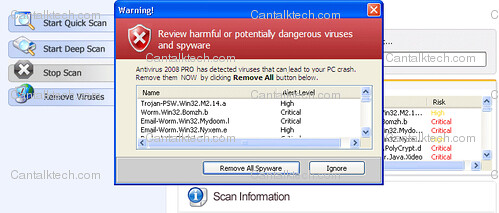
Smart Fortress Removal
For information on how to remove smart fortress virus, please refer to this post on getting rid of fake antiviruses from a computer using Malwarebytes.
Smart Fortress 2012 Warning: Samples of Bogus Alerts Generated by this Fake Antivirus
Intercepting programs that may compromise your privacy and harm your system have been detected on your PC.
Click here to remove them immediately with Smart Fortress 2012
Warning!
Application cannot be executed. The file notepad.exe is infected.
Please activate your antivirus software.
Warning: Your computer is infected
Detected spyware infection!
Click this message to install the last update of security software…
Saturday, February 25, 2012
Strong Malware Defender
Beware of the fake Strong Malware Defender virus. One characteristic of fake security softwares such as this Strong malware is that the scammers behind them make use of legitimate sounding names so as to give the impression that the program is a reliable software. The Strong virus wants to give the impression that it is a legitimte software so people will spend money for it.
Is Strong malware Defender a fake software?
If a particular program suddenly popped out of your computer and you are flooded by warnings telling you that there are security breaches and infections such as malwares, viruses and trojans in your PC followed by an advert to purchase a Strong Malware Defender, you are likely seeing popups from a fake antivirus- associated malware. Do note that scammers can even use names of real antiviruses so do not easily fall to rogue software traps.
Strong malware removal: How to Strong malaware Defender Strong virus
This article on fake antivirus removal will give you information on removing Strong virus.
Friday, February 24, 2012
Home Malware Cleaner
The Home Malware Cleaner virus is a malware that causes infected computers to show rogue windows advanced security center alert. This is an effort to convince computer users that the software has detected security issues in the computer. By making it appear that the computer needs to be cleaned, it becomes much easier for the malware to market the rogue home security Cleaner key and its rogue "full version". *
Is home security Cleaner a fake software?
Characteristics of computers that have been infected by rogue softwares such as the home Malware virus include misleading and annoying popups alerting of detected computer threats. These threats and security issues are often exaggerated or do not actually exist. Google redirects to affiliated sites often happen to further bombard computer users with misleading product testimonials. Clones of the home Malware Cleaner virus include the likes of personal shield pro and mac protector.
To make yourself safe from rogue security tools, always search for independent reviews everytime you purchase any software online. It is also a good practice to stay away from buying antiviruses promoted through popups and browser redirects. In case you have already spent your money believing that this rogue antivirus is legitimate, consider contacting your credit card issuer to report the bogus transaction and to get information on how to get your money back.
Home Malware Cleaner Virus Removal
Consider getting rid of this "home security Cleaner" infection once symptoms show up in your computer. For a detailed information on how to remove home Malware Cleaner virus, you may refer to this post on fake antivirus removal.
Windows Shield Tool
Ever received a warning from a Windows shield tool telling you there are viruses, errors and similar malwares in your computer? You may be interested in reading this article on the fake Windows shield tool Virus.
Makers of fake virus and spyware protection softwares have concocted different names and versions of their fake antivirus protection wares to victimize people who are willing to spend money to protect their computer from viruses, trojans and similar shield threats. Do not be duped into buying its license key.
The fake Windows shield Tool may bombard your Windows with fake system scans, ads and may even cause browser redirects. The Windows shield tool malware may cause your computer to show fake system scans so you will be forced to buy the Windows shield tools that it advertises.
Removing Windows shield tool virus is necessary because the shield tool Windows virus can slow make it hard for you to work online. Windows shield tool removal is also imperative to get rid of Windows shield Tool popups in your screen which can be very annoying and may disturb you while you are working online.
Popups from this windows shield tool virus may look like:
System component corrupted!
System reboot error has occurred due to lsass.exe system process failure.
This may be caused by severe malware infections.
Automatic restore of lsass.exe backup copy completed.
The correct system performance can not be resumed without eliminating the cause of lsass.exe corruption.
How to remove Windows shield tool
You can use this software as a Windows shield tool removal tool.
* Reboot your computer in Safe mode with networking. Do this by restarting your PC and pressing the F8 key after hearing your computer beep on startup. Once the Windows Advanced Options menu appears, select Safe mode with networking and then press ENTER.
* Download Malwarebytes’ Anti-Malware.
* Double-click mbam-setup.exe and follow the prompts to install the program.
* At the end, be sure a check-mark is placed next to the following:
Update Malwarebytes’ Anti-Malware
Launch Malwarebytes’ Anti-Malware
* Click Finish.
* If an update is found, Malbytes anti malware will download and install the latest version.
* Once the program has loaded, select Perform quick scan, then click Scan.
* When the scan is complete, click OK, then Show Results to view the results.
* Be sure that everything is checked, and click Remove Selected. Reboot your computer if prompted.
* When completed, a log will open in Notepad.